 Edgar de Wit
At XLReporting, we’re continuously improving the way you build, run, and work with financial reports, forecasts, and models. With Release 41 (September 20, 2026), we’re introducing new functionality that gives you more control over your models, makes data entry more flexible, and brings AI-powered help even closer to your daily work.
These additions make it easier to create models that respond dynamically to different situations while keeping the user experience simple and controlled.
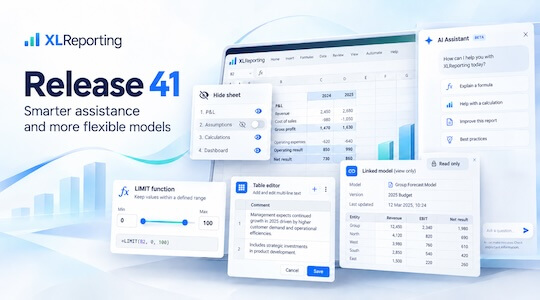
We’ve made several improvements to the Popup table editor in models.
You can now enter multi-line text, while row heights automatically adjust to fit the content. This makes popup tables more practical for comments, descriptions, assumptions, and other information that needs a little more space.
Popup tables can also be opened in view-only mode, giving users access to detailed information without allowing them to edit it.
Together with the new view-only option for linked models, this gives you more flexibility to present supporting information exactly where users need it.
Release 41 introduces a new AI assistant in the Help screen.
Instead of searching through documentation, you can ask a question in natural language and receive an answer directly within XLReporting. The assistant responds in the same language as your question, making support more accessible for users across different countries and teams.
We’ve also enhanced the existing AI assistant in Run Report and Run Model. It can now provide richer analysis, conclusions, and summaries of your financial reports—helping you move from numbers to insights more quickly.
Release 41 is focused on making everyday tasks more intuitive.
Conditional sheet visibility helps keep complex models relevant to each user. Improved popup tables make detailed data easier to read and maintain. View-only options help you share information without exposing editing functionality. And expanded AI assistance makes both financial analysis and product support easier to access.
With Release 41, XLReporting continues to combine flexible financial modelling with a straightforward user experience.
Whether you’re building sophisticated planning models, presenting supporting information to colleagues, analyzing financial results, or simply looking for an answer while working in the platform, these new features are designed to reduce unnecessary steps and keep you focused on the information that matters.
Explore the new release today. Log in to XLReporting to try the new features, or schedule a demo with our team if you want to see how these innovations can transform your reporting and planning.
Back to the listSchedule a Meeting with one of our Planning and Reporting Experts.
Let's TalkXLReporting is an online Planning and Reporting Platform to create reports, budgets and forecasts the way you want.


© 2009-2026 XLReporting
® All rights reserved
